Google Drive-2.624.2000
- ARGOSLABS
| Google Drive |
|---|---|
Author: Irene Cho This plugin creates or manages the folders and files in Google Drive. Primary Features You can create a new folder, upload, or download a file, search specific files, and share a file/folder with another user, group, or domain. Prerequisite A file token.pickle which stores the credential information of Google API.(Refer Google Token Plugin) |

1. Plugin operations and required parameters
Operations | Parameters | Output |
|---|---|---|
Create a Folder | Folder Name: A new folder name. (e.g. Test) | Folder Id |
Upload a File | File-path: Absolute path of an uploading file. | File Id |
Folder Id(optional): -The folder id from Google Drive to upload a file. -The ID can be found from ‘File List’ operation. | ||
Download a File | File ID: File id from Google Drive to download. | File path |
File Path: Absolute path to save a file. | ||
File Type 1) File in Google Drive. 2) G Suite Files. (e.g. Google Sheet, Doc…) | ||
Mime Type (for G Suite Files) (https://developers.google.com/drive/api/v3/ref-export-formats) | ||
Recently Modified | # of file/folder: Default 10 | File List |
Folder Id(optional): Specify a folder to get the files in it. | ||
Search | Search Query (https://developers.google.com/drive/api/v3/search-files) | File List |
Folder Id(optional): Specify a folder to get the files in it. | ||
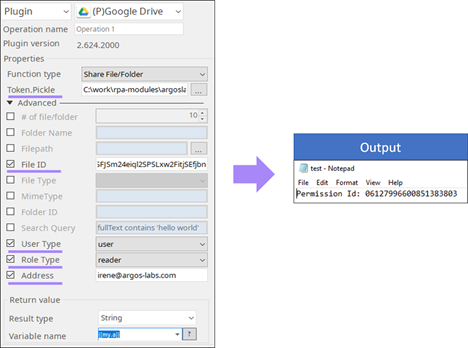
Share File/Folder | User Type: User, Group, Domain | Folder/ File Id |
Role Type: Reader, Writer, Commenter. (only for domain) | ||
Address (e.g. example@argos-labs.com, argos-labs.com) *Only the email will be sent when the user type is ‘user’. | ||
Folder Id or File Id |
2. Example of the plugin in STU
- Share File/Folder