Path Manipulation-3.615.914
- ARGOSLABS
Owned by ARGOSLABS
Dec 01, 2023
1 min read
Loading data...
| Path Manipulation |
|---|---|
Author: Kyobong An
Description This plugin contains various functions to manipulate “filepathes”.
For detailed explanation of the base technology of this plugin, please refer to this link below.
https://docs.python.org/3/library/os.path.html
|
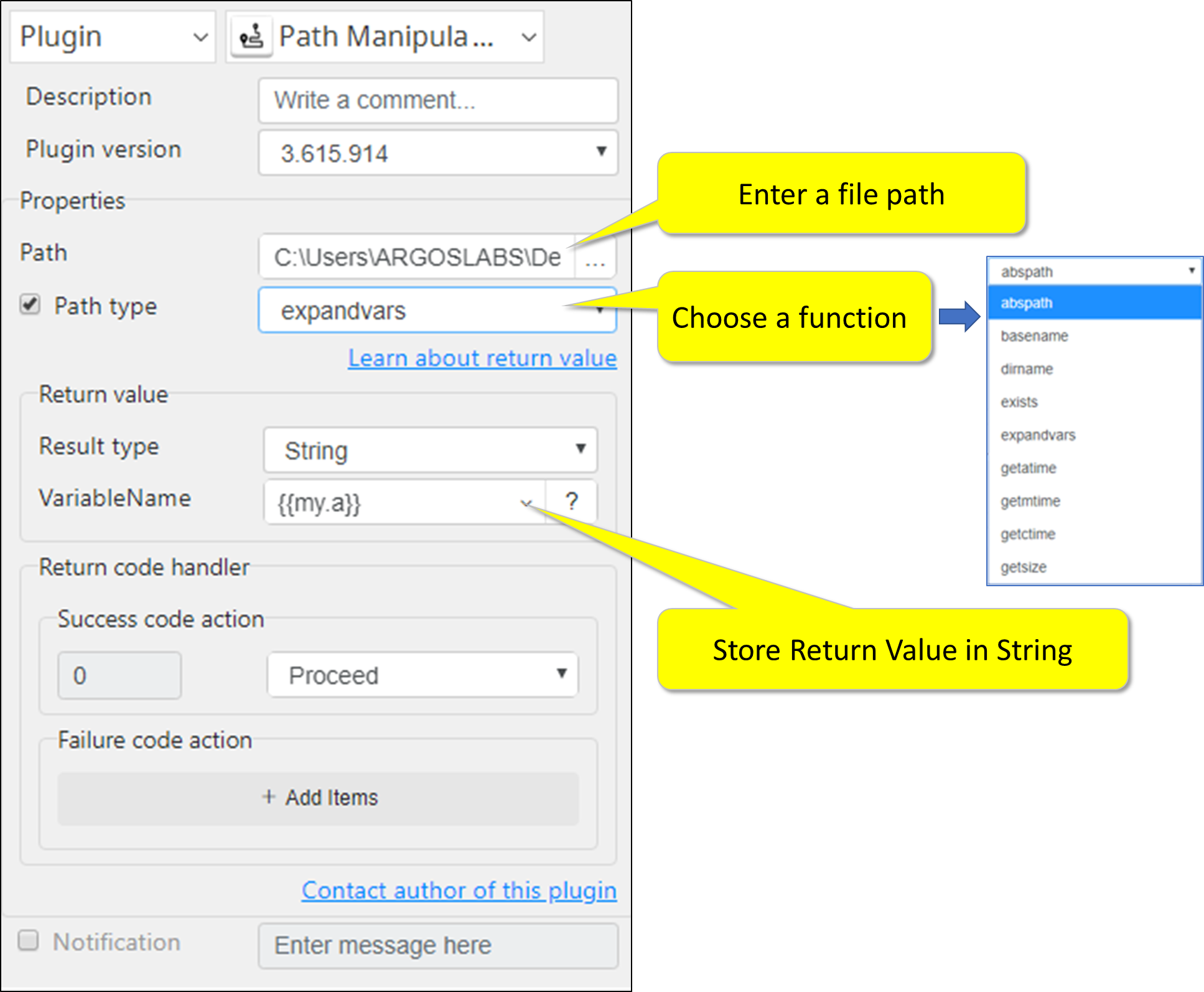
Required Input
- Full file path of a file
Optional Input
- Choose one of these operations – See below for usage and return value samples.
- abspath
- basename
- dirname
- exists
- expandvars
- getatime
- getmtime
- getctime
- getsize
Return Value
- Select String - See chart below
When input is C:\Users\ARGOSLABS\Desktop\Temp\data.csv
| Operations | Full Name | Output (Example) |
|---|---|---|
| abspath | Absolute path | C:\Users\ARGOSLABS\Desktop\Temp\data.csv |
| basename | Base name | data.csv |
| dirname | Directory name | C:\Users\ARGOSLABS\Desktop\Temp\ |
| exists | Exists? | True/False |
| expandvars | Expand Environment Variable | see below |
| getatime | Get access time | date-time mm-dd-yyyy hh:mm:ss |
| getmtime | Get modified time | date-time mm-dd-yyyy hh:mm:ss |
| getctime | Get created time | date-time mm-dd-yyyy hh:mm:ss |
| getsize | Get filesize | file size in bytes |
 Note: How to use “expandvars”
This function returns path that are stored in the environment variables in fully expanded format. For example, %appdata% will return C:\Users\ARGOSLABS\AppData\Roaming
Result Codes
0 for successful execution
1 for invalid input
9 for everything else
How to set parameters
Return Code
Code | Meaning |
|---|---|
| 0 | Execution successful |
| 1 | Open error |
| 9 | Other errors |