Env Check-2.713.2500.I
Env Check | |
|---|---|
Author: Jerry Chae This plugin checks and records the “bot execution environment specifications” including hardware, software, screen settings, language settings, network settings for ARGOS Low-code servers, as well as resource availability information. |
Input
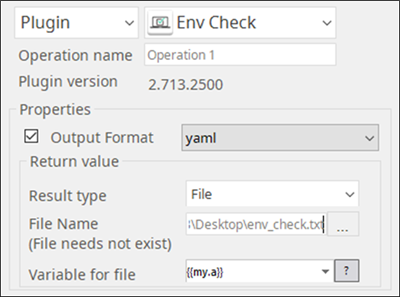
Output Format
You may choose one of 3 output formats below,
CSV (default)
JSON
yaml
Output
Information to be obtained is below,
1.CPU Count Resource (%)2.Disk Device Resource (%) Availability3.Language Default Preference Order4.Memory Resources (%) Availability5.Monitors Resolutions in Pix Resolutions in mm Scaling (%)6.Platform CPU model Operating System, Version, and Service Pack CPU type7.IP Address Public8.ARGOS Low-code RPA Server Accessibility Supervisor Pypi Pypi_files
Return Value Example
When .yaml is chosen as shown above as the output format, the output would look like the example below,
cpu: count: 8
percent: 25.0%
disks:
- device: C:\
percent: 14.6%
total: 915.73G
- device: D:\
percent: 89.5%
total: 14.55G
language:
default: en_US
preffered:
- en_US
memory:
percent: 70.3%
total: 11.88G
monitors:
- height: 1080
height_mm: 193
name: \\.\DISPLAY1
scale: 100
width: 1920
width_mm: 344
platform:
machine: AMD64
platform: Windows-10-10.0.18362-SP0
processor: Intel64 Family 6 Model 142 Stepping 10, GenuineIntel
public_ip: 76.21.104.68
services:
- host: rpa.argos-labs.com
name: supervisor
opened: opened
port: 443
- host: pypi.org
name: pypi
opened: opened
port: 443
- host: files.pythonhosted.org
name: pypi_files
opened: opened
port: 443
Return Code
Code | Meaning |
|---|---|
0 | Execution successful |
1 | Execution failed |