Codat API-2.127.1000
- ARGOSLABS
| Codat API |
|---|---|
Authors: Irene Cho Description This plugin is a low-code option for the UK’s fintech SaaS called Codat. https://www.codat.io/ The solutions include an extensive choices of API level connectivity to many financial services. It allows the ARGOS Low-code users to integrate some of those handy Codat features into their automation scenario without coding. For more information about Codat API Primary Features
|
Input (Required)
- Endpoint
- API Key
- Company Id
Plugin Operations and Parameters
Operations | Parameters | Output |
Get Customer ID | Endpoint, API Key, Company Id | Name, Id (csv) |
Get Connection ID | Endpoint, API Key, Company Id | Connection Id (str) |
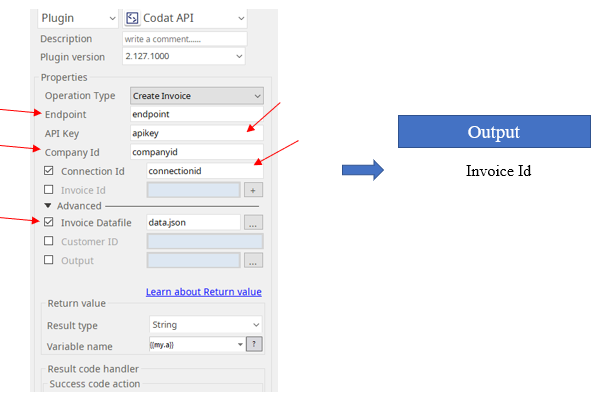
Create Invoice | Connection Id | Invoice Id (str) |
Invoice Datafile: An absolute file path of the invoice file. Refer to the invoice template. | ||
Retrieve Invoice | Invoice Id | File path of the invoice file (str) |
Output(optional): Specify the absolute output file path |
Invoice Template in Codat API
- To create an invoice using Codat API, you must follow the certain format of invoice data (json).
- The only required parameter to create an invoice is Customer Id. It can be obtained from the operation of ‘Get Customer Id’ in Codat plugin.
See Below for the sample json file for Codat invoice creation
{
    "currency": "GBP",
    "currencyRate": 1.0,
    "id": "str",
    "invoiceNumber": __Invoice Number__,
    "customerRef": {
        "id": __CustomerID__
    },
    "issueDate": __Invoice Date__,
    "dueDate": __Due Date__,
    "lineItems": [
        {
            "accountRef": {
                "id": "string",
                "name": "string"
            },
            "description": "string",
            "discountAmount": 0,
            "discountPercentage": 0,
            "itemRef": {
                "id": "string",
                "name": "string"
            },
            "quantity": 0,
            "subTotal": 0,
            "taxAmount": 0,
            "taxRateRef": {
                "id": "string",
                "name": "string"
            },
            "totalAmount": 0,
            "tracking": {
                "categoryRefs": [
                    {
                        "id": "string",
                        "name": "string"
                    }
                ],
                "customerRef": {
                    "companyName": "string",
                    "id": "string"
                },
                "isBilledTo": "Unknown",
                "projectRef": {
                    "id": "string",
                    "name": "string"
                }
            },
            "trackingCategoryRefs": [
                {
                    "id": "string",
                    "name": "string"
                }
            ],
            "unitAmount": 0
        }
    ],
    "modifiedDate": "2021-01-25T17:41:01.729Z",
    "note": "string",
    "paidOnDate": "2021-01-25T17:41:01.729Z",
    "paymentAllocations": [
        {
            "accountRef": {
                "id": "string",
                "name": "string"
            },
            "allocatedOnDate": "2021-01-25T17:41:01.730Z",
            "currency": "string",
            "currencyRate": 0,
            "date": "2021-01-25T17:41:01.730Z",
            "id": "string",
            "note": "string",
            "reference": "string",
            "totalAmount": 0
        }
    ],
    "sourceModifiedDate": "2021-01-25T17:41:01.729Z",
    "status": "Draft",
    "subTotal": __Net Total__,
    "totalAmount": __Gross Total__,
    "totalDiscount": 0,
    "totalTaxAmount": 0
}
Additional help information for the Codat website can be accessed from here/
https://api.codat.io/swagger/index.html#/
Example of parameter settings
Return Code
Code | Meaning |
|---|---|
| 0 | Execution successful |
| 1 | Execution failed |