Google Calendar-2.814.1100
- ARGOSLABS
Owned by ARGOSLABS
Dec 01, 2023
2 min read
Loading data...
| Google Calendar |
|---|---|
Author: Irene Cho This plugin manages the schedules in Google Calendar. Primary Features
Prerequisite
|
1. Plugin parameters
- Event Id: Event identifier. It can be obtained from ‘Event List’ operation.
- Calendar Id: Calendar identifier. Default is ‘primary’ which is the primary calendar of the currently logged in user.
https://docs.simplecalendar.io/find-google-calendar-id/ - Max Result: Maximum number of events returned on one result page.
- List from: Upper bound (exclusive) for an event's start time to filter by e.g. now, 2020/06/20
- Start Time: Event start time.
- Start Timezone: The time zone in which the time is specified which is formatted as an IANA Time Zone Database name, e.g. "Europe/Zurich"
https://en.wikipedia.org/wiki/List_of_tz_database_time_zones - End Time: Equal start time.
- End Timezone: Equal start timezone.
- Even Title: Title(or summary) of the event.
- Attendees: Attendees’s email of the event.
- Send Invitation: Default is False.
- Additional Values: Additional properties to put when you create or update an event.
 format? ‘Property:value’ e.g. location: San Jose, description: Event at Argos-Labs
https://developers.google.com/calendar/v3/reference/events/insert
Available time format
Datetime
- 'YYYYMMDD-HHMMSS', 'YYYY-MM-DD HH:MM:SS',
- 'YYYY/MM/DD HH:MM:SS', 'MMDDYYYY-HHMMSS',
- 'MM-DD-YYYY HH:MM:SS', 'MM/DD/YYYY HH:MM:SS',
- 'M/D/YYYY HH:MM:SS', 'YYYYMMDD-HHMMSS.mmm',
- 'YYYY-MM-DD HH:MM:SS.mmm', 'YYYY/MM/DD HH:MM:SS.mmm',
- 'MMDDYYYY-HHMMSS.mmm', 'MM-DD-YYYY HH:MM:SS.mmm',
- 'MM/DD/YYYY HH:MM:SS.mmm', 'M/D/YYYY HH:MM:SS.mmm'
Date
- 'YYYYMMDD', 'YYYY-MM-DD', 'YYYY/MM/DD',
- 'MMDDYYYY', 'MM-DD-YYYY', 'MM/DD/YYYY',
- 'M/D/YYYY', 'B D YYYY', 'B D, YYYY', 'D B YYYY'
Operations | Parameters | Return Value (CSV) |
|---|---|---|
| Event List | Calendar ID(required) | Title, start, event_id |
| Max Result(Required) | ||
| List from(Required) | ||
Create Event | Calendar Id (required) | Title, start, event_id |
Start Time (required) | ||
Start Timezone (required) | ||
End Time (required) | ||
End Timezone (required) | ||
Even Title (optional) | ||
Attendees (optional) | ||
Send Invitation (optional) | ||
Additional Values (optional) | ||
Delete Event | Calendar Id (required) | “Delete the {{event_id}} successfully” |
Event Id (required) : Obtain from Event List | ||
Update Event | Calendar Id (required) | Title, start, event_id |
Event Id (required): Obtain from Event List | ||
Equals ‘Create Event’ parameters |
2. Example of the plugin in STU
- Event List
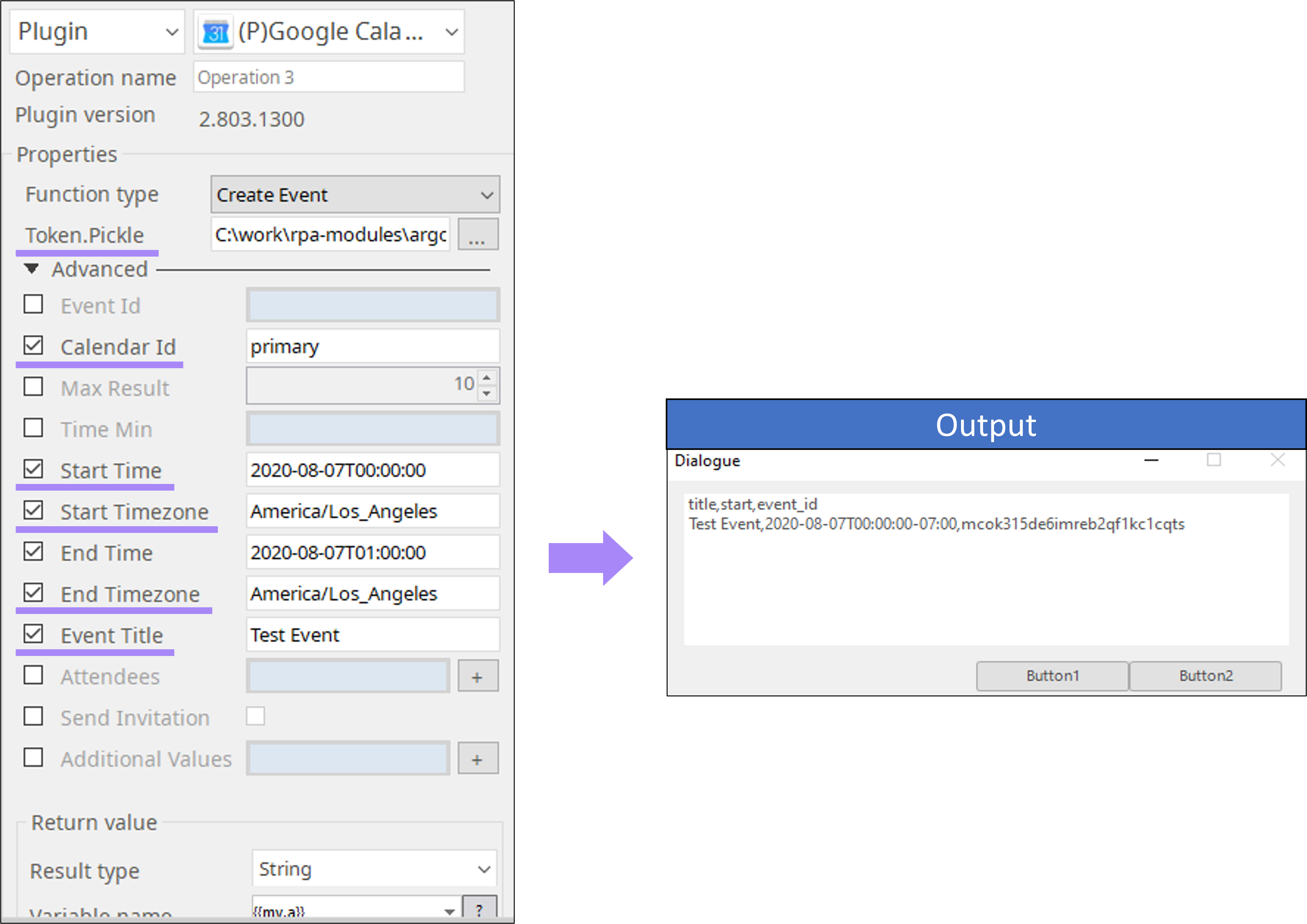
- Event List