Benny's Secret Functions
- ARGOSLABS
Guide to Variables used in STU
How “Variables” work in STU and PAM
- Format
- {{GroupName.VariableName}}
- {{GroupName.VariableName(index, function, and another variable)}}
- Data Typesa. Omnipotent (String-base)Variable data types get automatically converted into an appropriate type such as Integer, Float, and Date, when the data has been fed into an Operation.
3. Data Store Types
- Simple Stores as one data and retrieves plainly with {{GroupName.VariableName}}
- Array Stores as a series of data and retrieves with index {{GroupName.VariableName(5)}}
- CSV Stores as a table of data and retrieves with column/row coordinates where the VariableName represents column and index represents row like {{GroupName.A(5)}} --- see more about CSV variable in the section right below.
4. CSV type variables
- This type of variables can only be generated by the Plugin operations as one of the three Return Value options
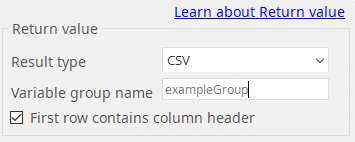
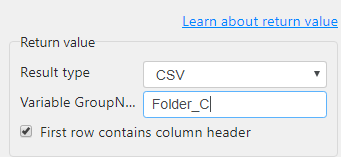
When you want to use the column headers as Column names leave the check box checked just like in the example given above. Otherwise, columns are uppercase alphabets like A, B, C --- AA, AB and so on just like the notation in MS Excel.
5. Array type
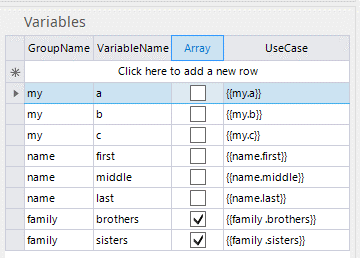
- You can create and define array variables in the Variable section in STU (lower left corner).
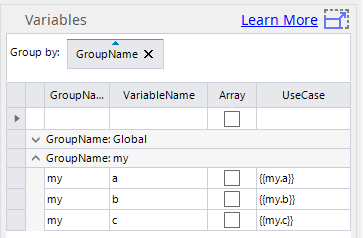
In the example given below, {{family.brothers}} and {{family.sisters}} are the array variables as they have the check boxes under array column checked.
- You can create and define array variables in the Variable section in STU (lower left corner).
6. Index
- Index is integer (you can use variable) starting with 1
Examples
((family.brother(1))) or {{family.brother({{loop.count}})}}
7. Functions like COUNT, APPEND, and LAST are available.
- They must be all uppercase letters.
- COUNT shows you how many data exist in array or in a column of a CSV variable.
- APPEND add a new data at the end of an existing array variable.
- LAST retrieves the data at the end of the array variable.
Example
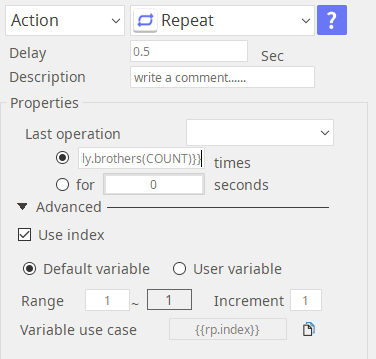
{{family.brothers(COUNT)}}
{{family.sisters(APPEND)}}
{{family.sisters(LAST)}}
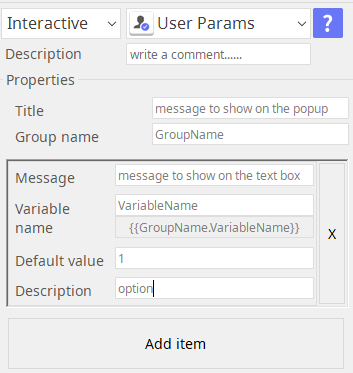
8. The User Params operation in the Interactive group will generate its own variable.
9. Repeat counter variable.
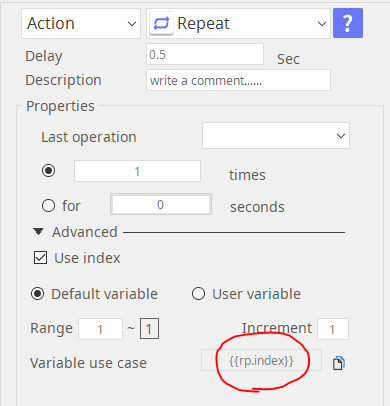
- The Repeat operation manages a local (Repeat specific) variable.
- It is shown as {{rp.index}}

There are 3 types of Variables used in STU.
- User defined variables
- Plugin generated variables
- Special variables
1. User defined variables
User Defined Variables are the ones that are defined in the Variable section of STU.
2. Plugin generated variables
Plugin/Operation generated variables are the variables specific to the Plugin when the Return Value of CSV has been selected.
One example is the User Param operation in the Interactive tool-group.

For most of plugin generated variables, Users get to define group name but the variable names are defined by the plugin itself.
In below example Folder_C becomes the group name of the variable.
Then in this example of File Monitor plugin, the variable names are Index, filepath, and filesize like described in its help document.

3. Special variables
Special Variables are fixed in the STU system such as {{rp.index}} in the Repeat operation which holds the counter data.
VARIABLES
1. Notation
{{group_name.variable_name}}
Double curly brackets in both front and the back and there is a . (period) in between group_name (your choice) and variable_name (your choice)
2. Examples
Define a "grp1" variable group like below in the 'User variables in Scenario'.
- "grp1" including 3 variables, "var1","var2",and "var3".
{
	# Group variable name: "grp1"
	"grp1": {
		# simple variable (number)
		"var1": 100,

		# simple variable (string)
		"var2": "Hello World, Thank you for using ARGOS"

		# array
		"var3": [ 1, "Hello", "World", "Thank you for choosing ARGOS" ]
	}
}
- "grp2" including 3 variables, "var4","var5",and "var6".
{
	# Group variable name: "grp2"
	"grp2": {
		# simple variable (number)
		"var4": 30,

		# simple variable (string)
		"var5": "I am a Bot"

		# array
		"var6": { 2, "ARGOS" }
}
Below are the variable notation examples and the actual value of the variable.
| Variable | Value | Description |
|---|---|---|
| {{grp1.var1}} | 100 | actual value of simple variable "var1" of group variable "grp1" |
| {{grp1.var3(2)}} | "Hello" | the 2nd item of array variable "var3" of group variable "grp1" |
| {{grp1.var3(APPEND)}} | ※ see below "How to use APPEND" | |
| {{grp1.var3(COUNT)}} | 4 | total number of items in the "grp1.var3" array variable. It is used as an index in "Repeat" action |
| {{grp1.var3(LAST)}} | "Thank you for choosing ARGOS" | the last item in the "grp1.var3" array variable |
| Hello {{grp1.var3(3)}} ! | "Hello World!" | Substitution. {{grp1.var3(3)}} placeholder is replaced with its actual value of array, "World |
FUNCTIONS
1. COUNT
How to use "COUNT" in "Repeat"
'COUNT' can be used as an index in "Repeat".
See below.
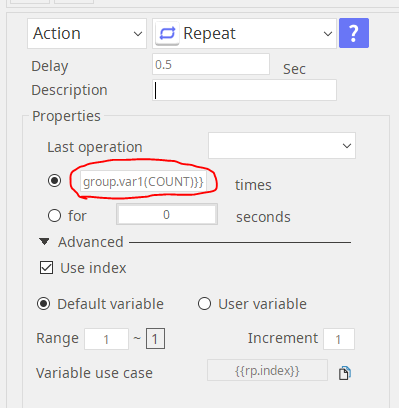
When repeating same operations for all items in array, you have to know the total number of items in array variable. You can obtain it by using 'COUNT'.
For examples, "{{grp1.var3(COUNT)}}" means the total number of items of "{{grp1.var3}}" array variable.
The value of {{grp1.var3(COUNT)}} is "4".
2. APPEND
How to use "APPEND"
Use case
- 'Excel Basic' action
- Result value of plugins
How to use "APPEND" in "Excel Basic"
Suppose you have a array variable that already has a values.
In this example, I'll show you how to append "{{grp2.var2}}" (simple variable) and "{{grp2.var3}}" (array) to another array variable "{{grp1.var3}}".
Sample Excel Data for "grp2":
| A | B | C | |
|---|---|---|---|
| 1 | var1 | 30 | |
| 2 | var2 | I am a Bot | |
| 3 | var3 | 2 | ARGOS |
Ex1. Append "{{grp2.var2}}" (simple variable) to "{{grp1.var3}}" (array)
- Add "Excel Basic" action
- Choose "Read" in 'Read/Write'
- Select an excel file to read in STU
- (Option) Set 'Sheet name' (default: sheet1)
- Click "Add Item"
- Set "Cell range" to "**B2**"
- Write "{{grp1.var3(APPEND)}}" in "Select variable" input box
※ To check out the result value of "{{grp1.var3}}", print on 'Notepad' by using 'Repeat" and 'TextInput' actions
| Results | Description |
|---|---|
1 Hello World Thank you for choosing ARGOS I am a Bot | {{grp1.var3}} values Appended value |
Ex2. Append "**grp2.var6**" (array) to "grp1.var3" (array)
- Add "Excel Basic" action
- Choose "Read" in 'Read/Write'
- Select an excel file to read in STU
- (Option) Set 'Sheet name' (default: sheet1)
- Click "Add Item"
- Set "Cell range" to "**B3:C3**"
- Write "**{{grp1.var3(APPEND)}}**" in "Select variable" input box
| Results | Description |
|---|---|
1 Hello World Thank you for choosing ARGOS ['2', 'ARGOS'] | Original {{grp1.var3}} values. Appended value. Array converted to a simple variable automatically. It is not a array but a simple variable. |
How to use "APPEND" with return value of plugin
There are 3 types in the result type of plugins. Only 'string' can be used with 'APPEND'.
- Select the result type of plugin to 'string'
- Select 'Variable name' in variable table drop down menu. (ex) {{grp1.var3}}
- Edit variable name like "{{grp1.var3(APPEND)}}". <br>The returned value is appended to {{grp1.var3}}.
Global Variables
- Global Variables are pre-defined variables that will store more commonly used environment specific information.
- Below is the list of the ARGOS Global Variables
- These variables are especially useful when you want to run a site-survey in advance for the production environment for your new “bot” – they capture all you need to know to prepare the bot for the production environment.
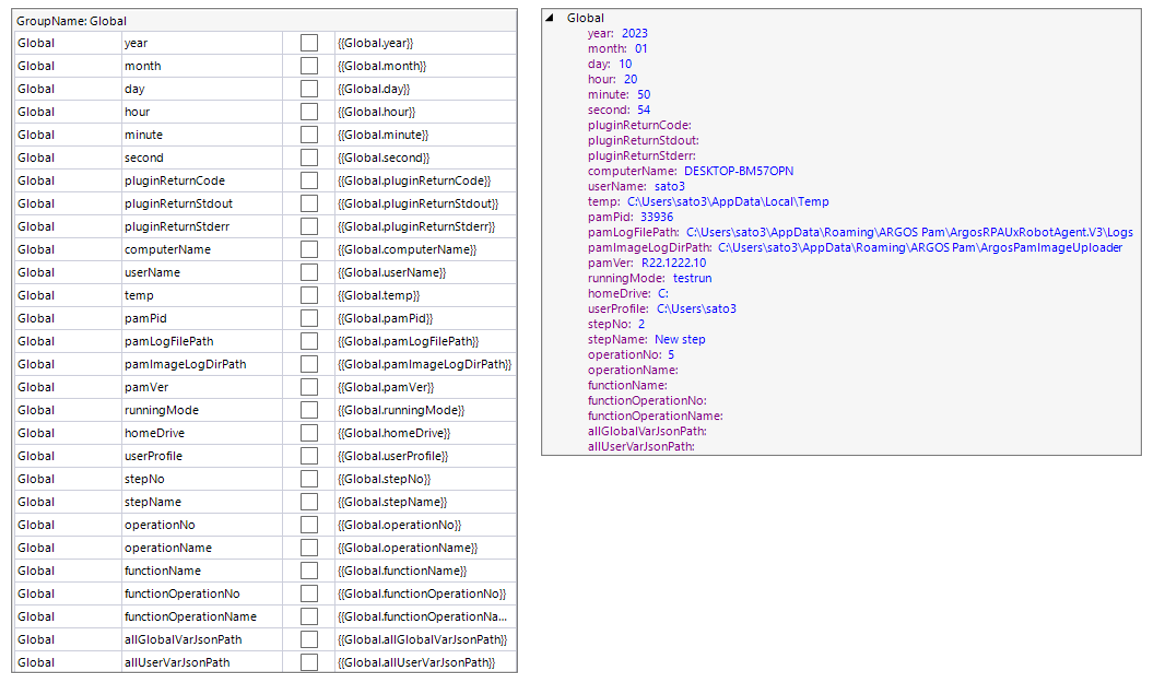
Global Variables to help your “logs”
- In Jan 2023, total 9 new Global Variables were added (see below)
- They are designed to provide a better “debug” experiences when used in conjunction with the Citizen Log plugin
- Just by adding them in the “Event Message” field will make your log much more intuitive and powerful in case you need to track down what really happened with your bot.
- Special Function
{Global.allUserVarJsonPath(groupname)}
• This will give you a full path to the JSON file that contains ONLY the list of User Variables with a specific “groupname”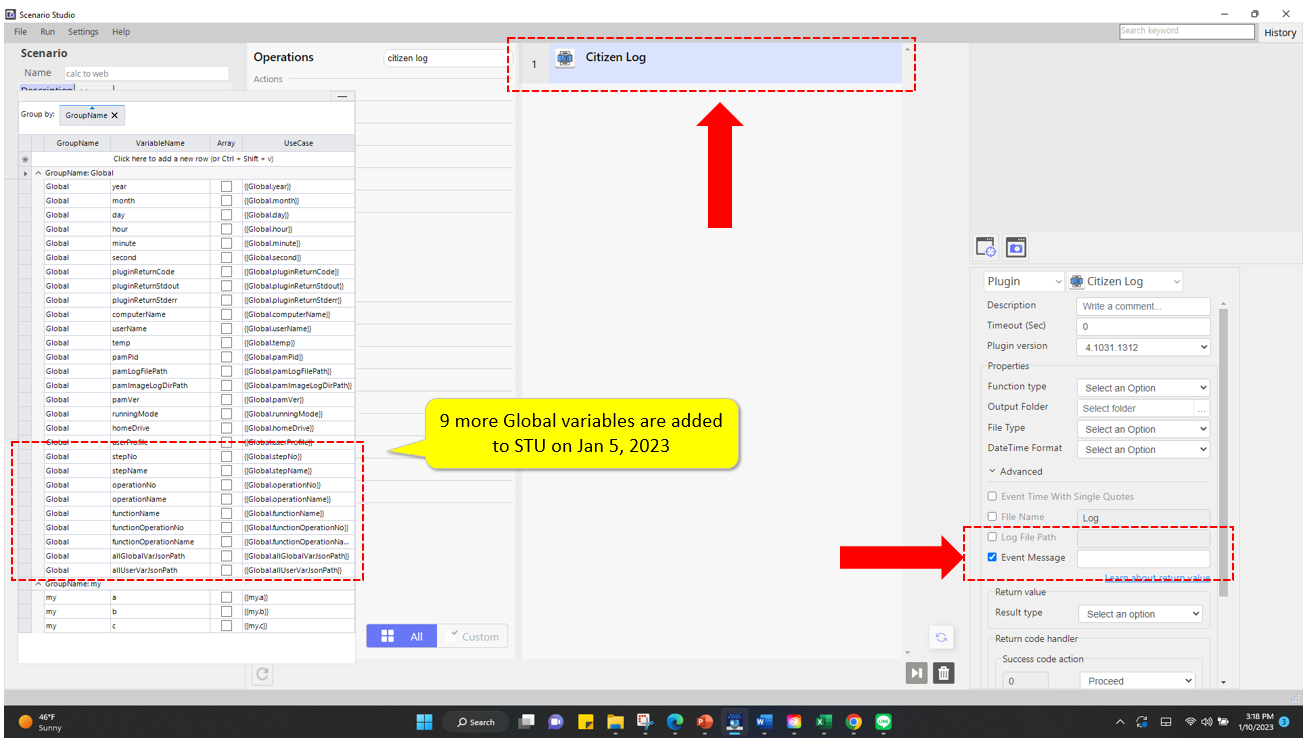
Update 2023.11.10
* How to register PAM from the command line
- "{PAM_Installation_Path}\Win\PAMCommandExecutor.exe" /R [ACCOUNT_NAME] [ACCOUNT_PASSWORD] [PAM_NAME]
-- ex) "C:\Program Files (x86)\ARGOS\AgentForRPA\Win\PAMCommandExecutor.exe" /r AccountName@argos-labs.com pw1234 PamName1234 If you enter your password incorrectly more than 5 times, you will not be able to use it for 30 minutes.
* How to change PAM to unregistered state from the command line
- "{PAM_Installation_Path}\Win\PAMCommandExecutor.exe" /U
-- ex) "C:\Program Files (x86)\ARGOS\AgentForRPA\Win\PAMCommandExecutor.exe" /U