Attach Image-2.1007.1100
- ARGOSLABS
Owned by ARGOSLABS
Dec 01, 2023
2 min read
Loading data...
| Attach Image |
|---|---|
Author: Irene Cho Primary Features
|
Plugin Parameters
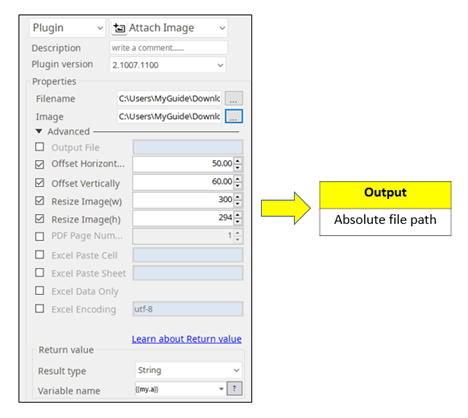
- Filename: An absolute file path to attach image (.pdf, .pptx, .docx, .xlsx)
- Image: An absolute file path of the image (.jpg, .png, .tif)
- Output File: An output file name. If you do not specify, a sample output file will automatically be created
- Offset Horizontally: Specify the X coordinate of an image file in pdf or move it to left in pptx
- Offset Vertically: Specify the Y coordinate of an image file in pdf or move it down in pptx
- Resize Image(w): Rescale the width of image with the unit of pixel. Default is original image size.
- Resize Image(h): Rescale the height image with the unit of pixel. Default is original image size.
- PDF Page Number: Select the page number in pdf. Default is 1.
- Excel Paste Cell: An excel cell to paste the image e.g. a1
- Excel Paste Sheet: An excel sheet to paste the image
- Excel Data Only: Print only data instead of formulas from an excel file
- Excel Encoding: Default is utf-8
Example of the plugin in STU