Outlook Email
Outlook Email
- ARGOSLABS
Owned by ARGOSLABS
Dec 01, 2023
| Outlook E-mail |
|---|---|
Author: Kyobong An Description and featuresThe Outlook Email plugin will operate local MS Outlook application. It has 5 functions listed below.
Prerequisite
|
Return value
- Mail Lists: type = str
time,from,subject
09-08-2021 09:53:10,akb0930@naver.com,test
- Get Contents: type = str
time,from,subject,body_file
09-08-2021
09:53:10,akb0930@naver.com,test,C:\Users\argos\Desktop\bongsplugin\plug-in-test\outlook\get contents\09082021095310-test.txt
- Save Attachment: Save Folder path
- Move Emails: "Successfully moved 0 emails. "
- Send Mails: “Successfully sending emails.”
Return Code
- 0 Execution Successful
- 1 All other responses from the plugin
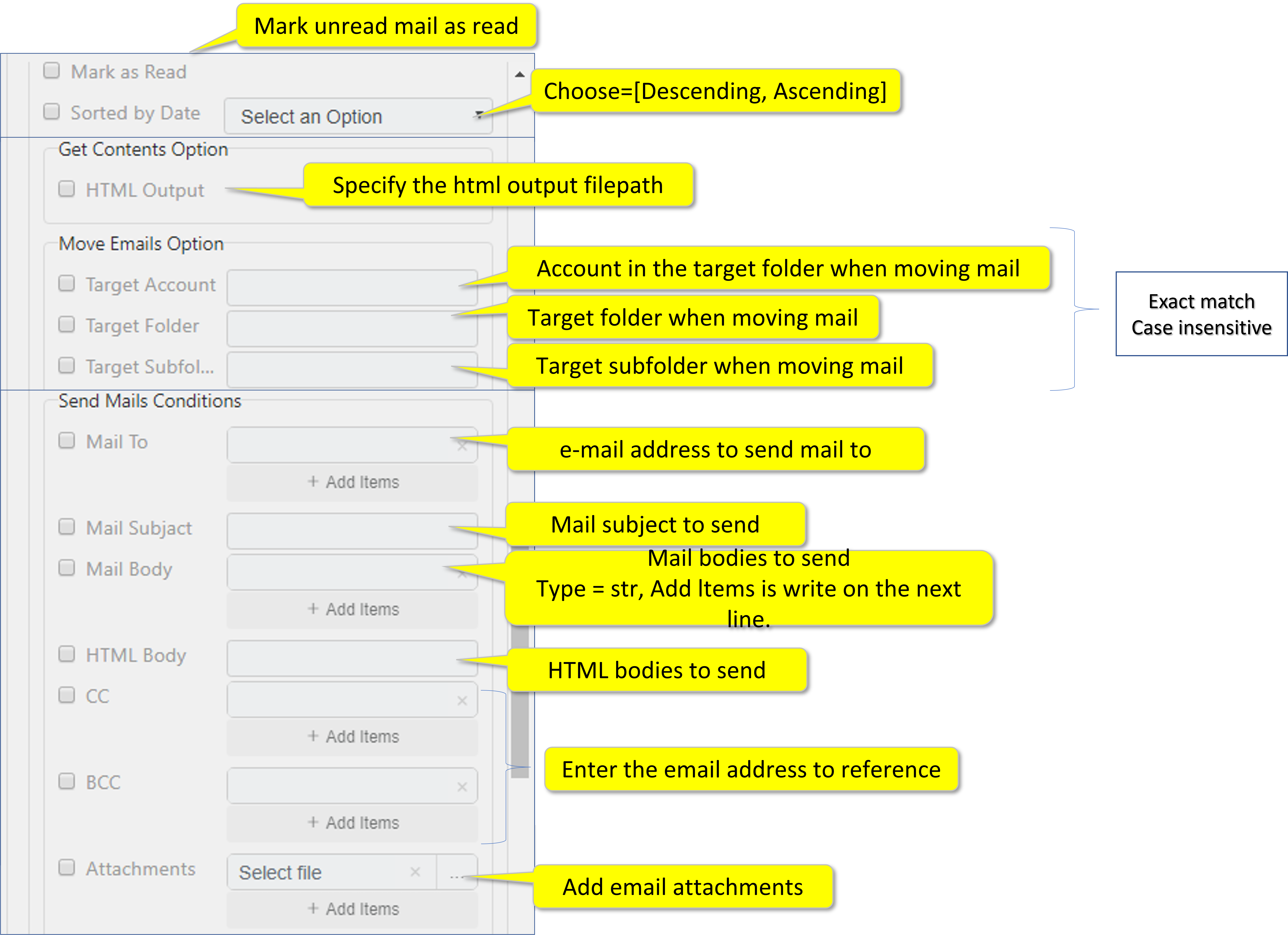
Parameter settings - Requirements and Options
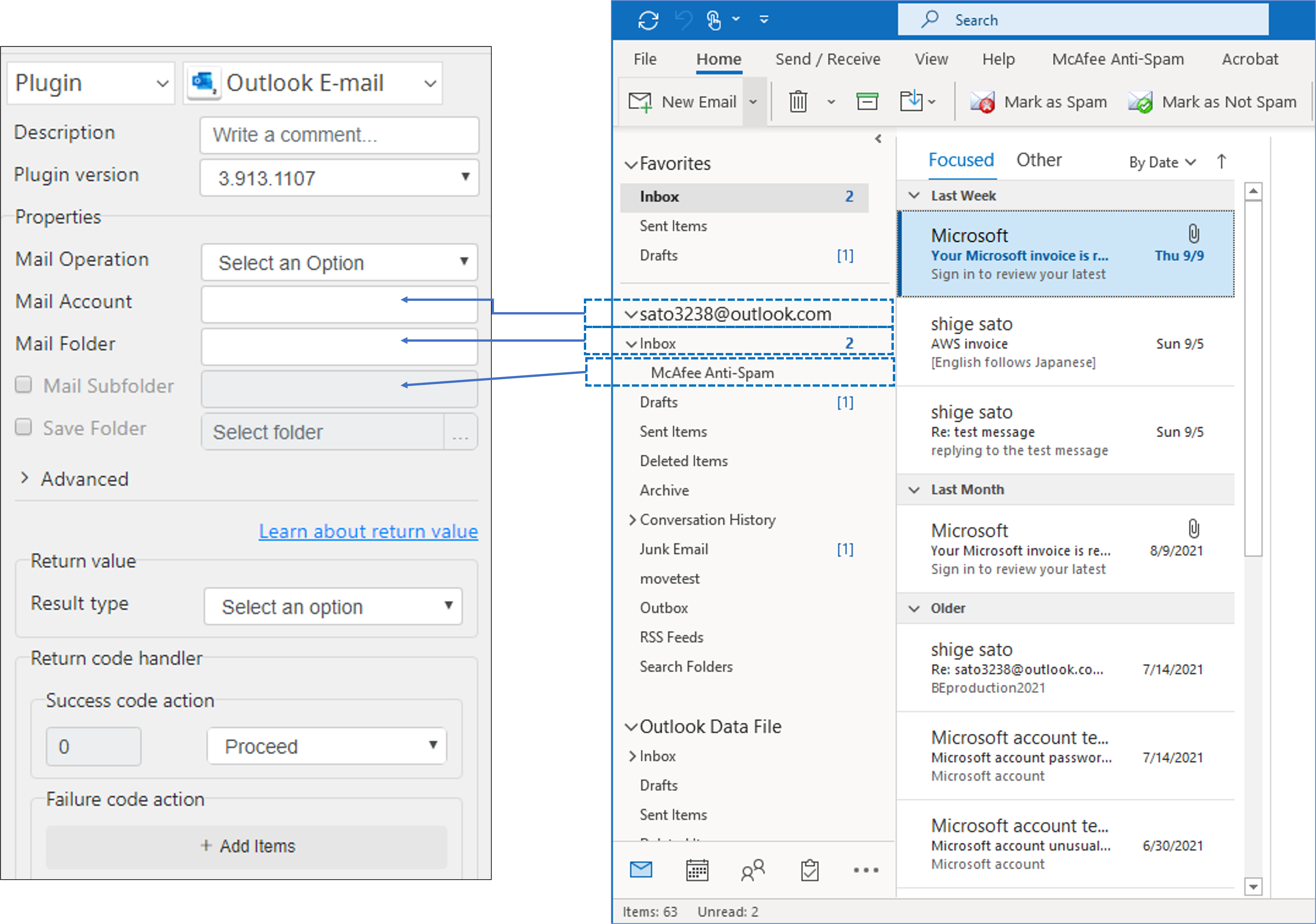
1. Account – Folder – Subfolders
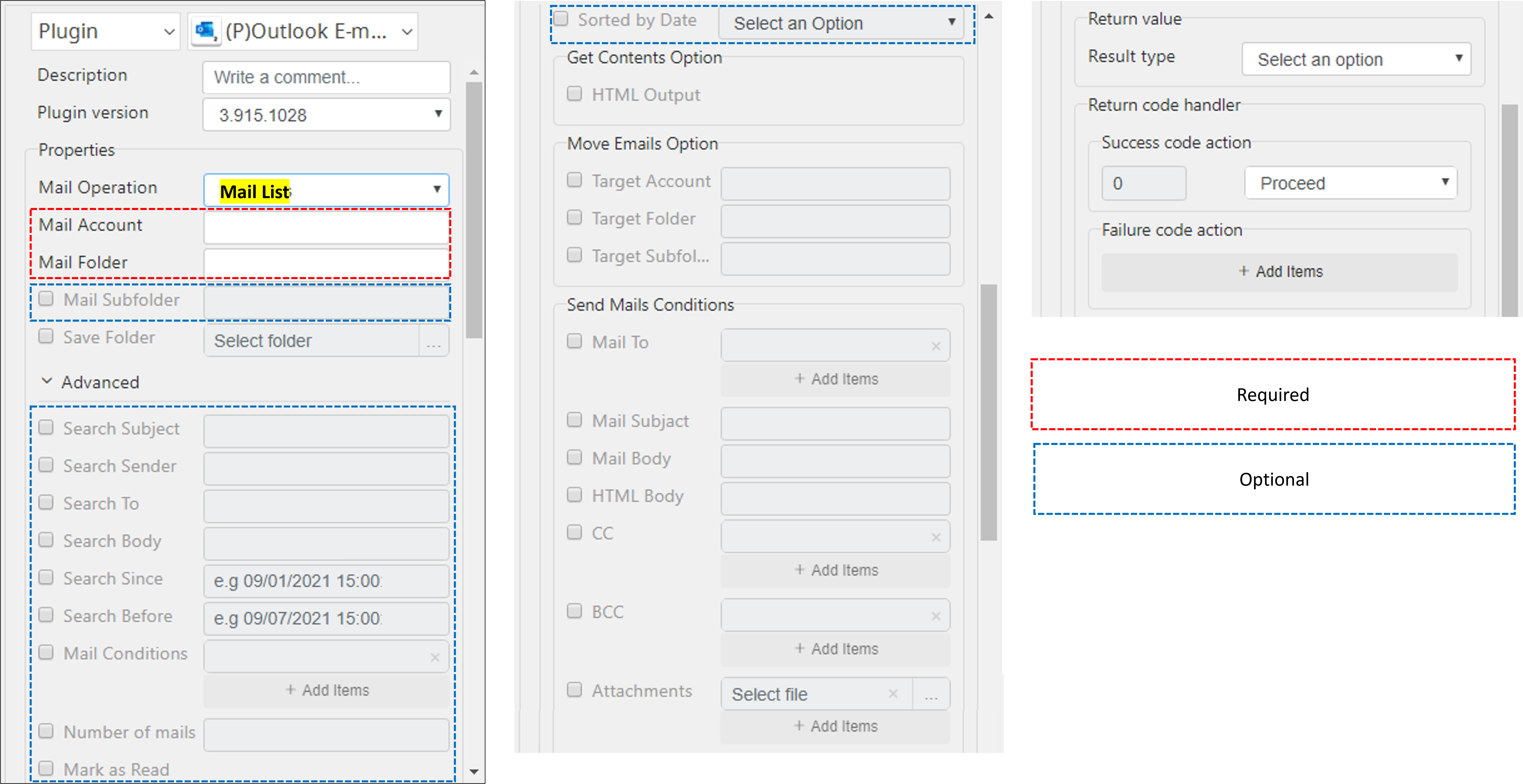
2. Mail List
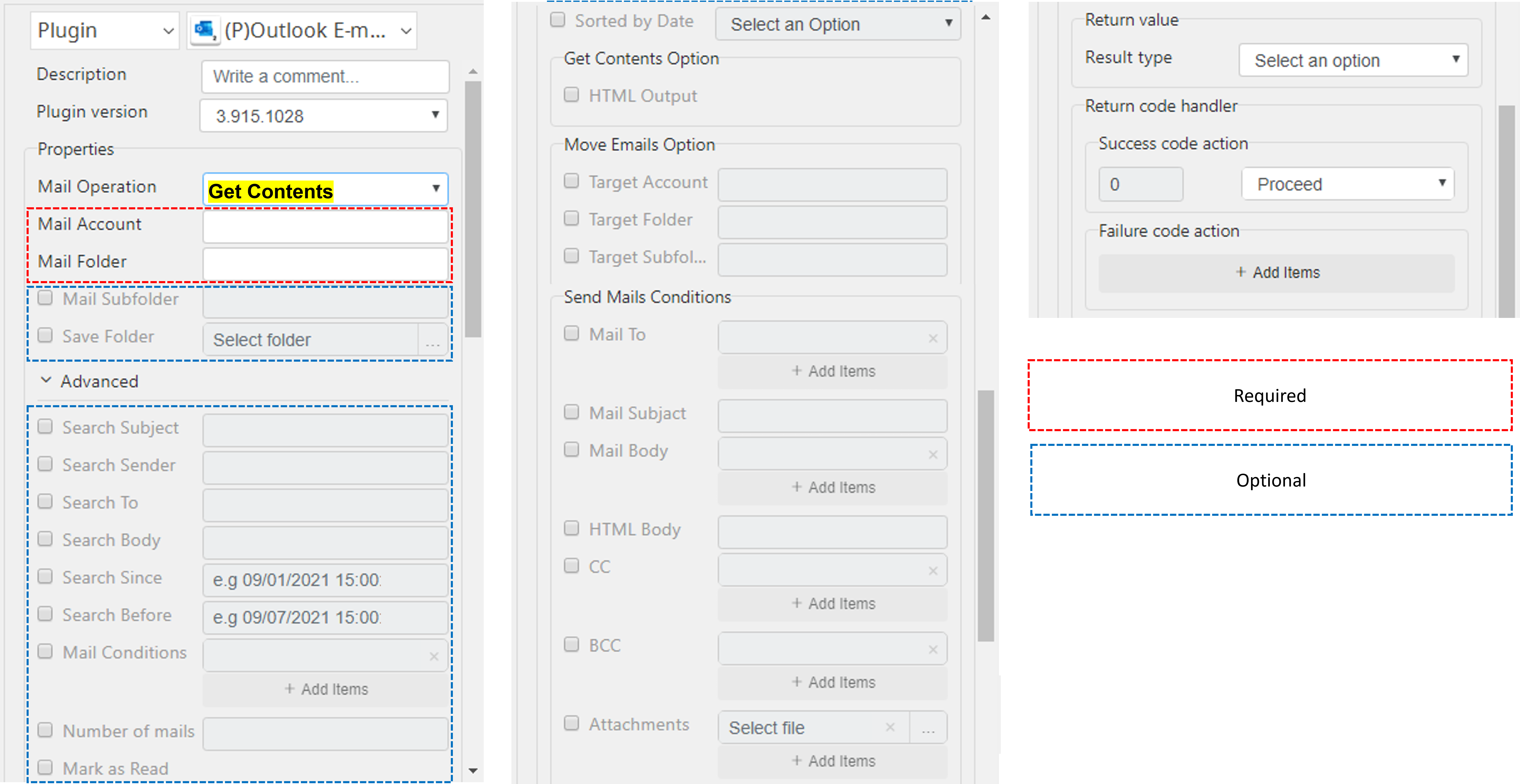
3. Get Contents
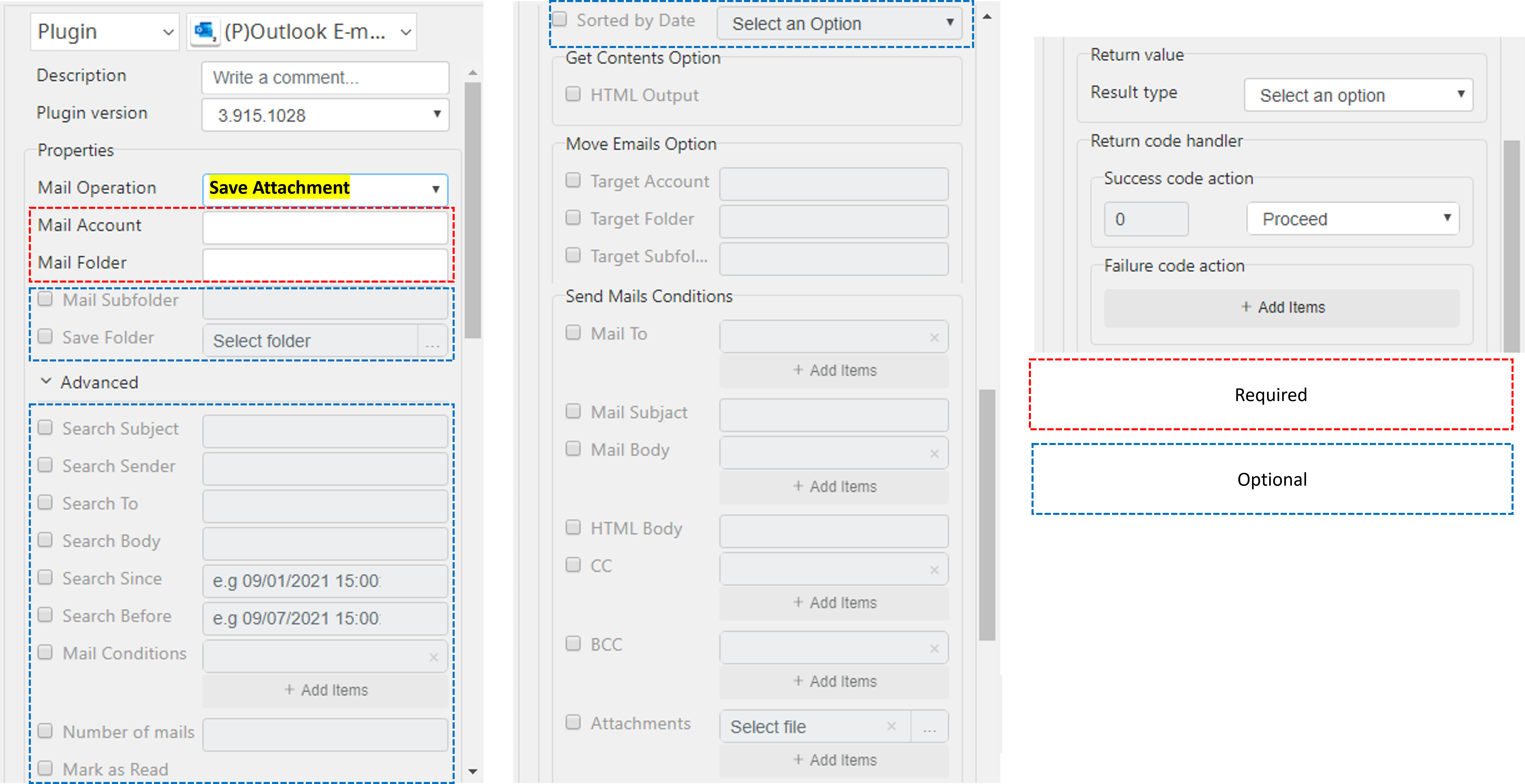
4. Save Attachment
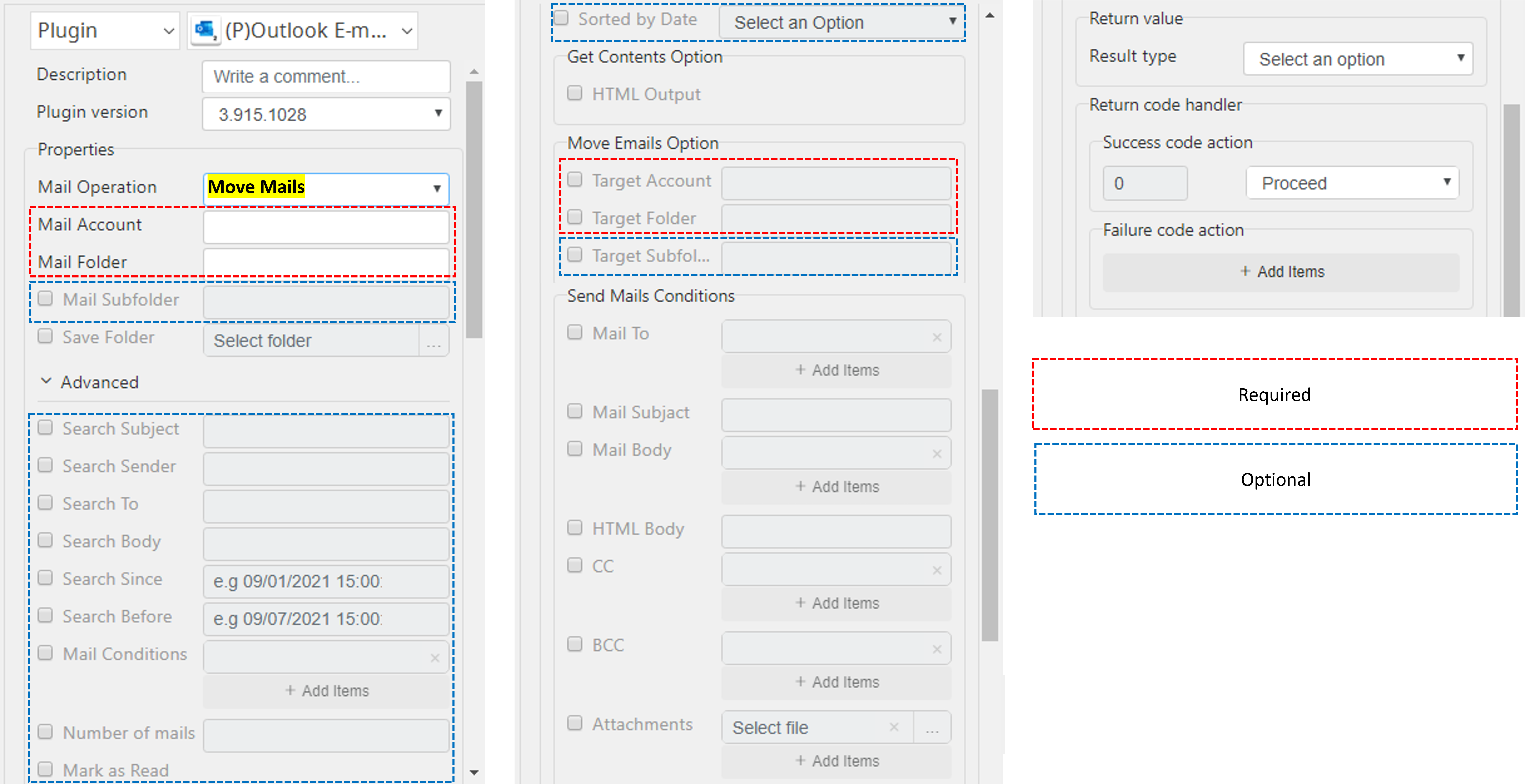
5. Move Mails
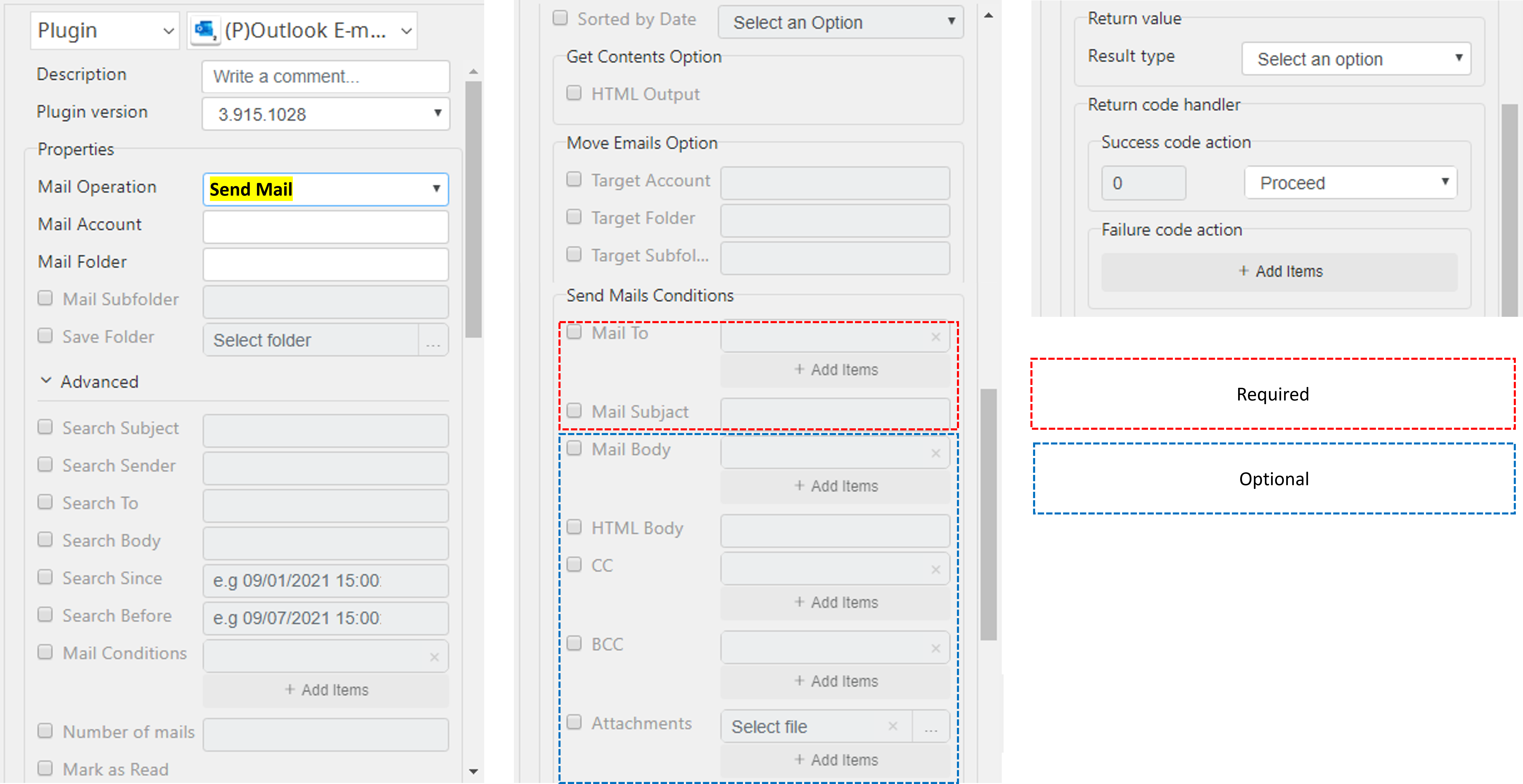
6. Send Mail
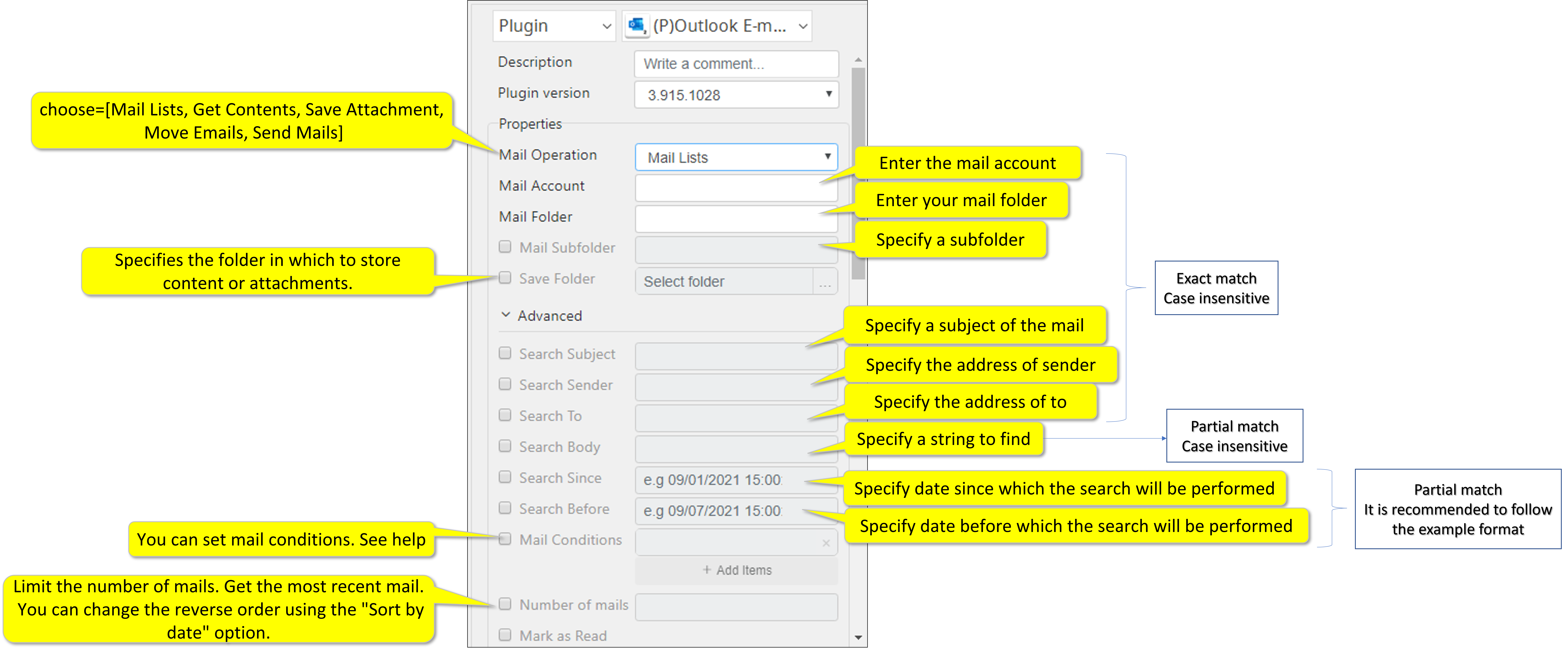
Format for parameters
All Plugins
- ABBYY Download
- ABBYY Status
- ABBYY Upload
- AD LDAP
- Adv Send Email
- API Requests
- ARGOS API
- Arithmetic Op
- ASCII Converter
- Attach Image
- AWS S3
- AWS Textra Rekog
- Base64
- Basic Numerical Operations
- Basic String Manipulation
- Bot Collabo
- Box
- Box II
- Chatwork GetMessage
- Chatwork Notification
- Citizen Log
- Clipboard
- Codat API
- Convert CharSet
- Convert Image
- Convert Image II
- Create Newfile
- CSV2XLSX
- Dashboard Api
- DashBord Api
- Data Plot I
- Date OP
- DeepL Free
- Detect CharSet
- Dialog Calendar
- Dialog Error
- Dialog File Selection
- Dialog Forms
- Dialog Info
- Dialog Password
- Dialog Question
- Dialog Text Entry
- Dialog Text Info
- Dialog Warning
- DirectCloud API
- Doc2TXT
- DocDigitizer Get Doc
- DocDigitizer Tracking
- DocDigitizer Upload
- Drag and Drop
- Dropbox
- Dynamic Python
- Email IMAP ReadMon
- Email Read Mon
- Env Check
- Env Var
- Excel2Image
- Excel Advanced
- Excel Advance IV
- Excel AdvII
- Excel AdvIII
- Excel Copy Paste
- Excel Formula
- Excel Large Files
- Excel Macro
- Excel Newfile
- Excel Simple Read
- Excel Simple Write
- Excel Style
- Excel Update
- Fairy Devices mimi AI
- File Conv
- File Downloader
- File Folder Exists
- File Folder Op
- File Status
- Fixed Form Processing
- Floating Form Processing
- Folder Monitor
- Folder Status
- Folder Structure
- FTP Server
- Git HTML Extract
- Google Calendar
- Google Cloud Vision API
- Google Drive
- Google Search API
- Google Sheets
- Google Token
- Google Translate
- Google TTS
- GraphQL API
- Html Extract
- HTML Table
- IBM Speech to Text
- IBM Visual Recognition
- Java UI Automation
- JP Holiday
- JSON Select
- JSON to from CSV
- Lazarus Forms
- Lazarus FTP
- Lazarus Grid
- Lazarus Invoices
- Lazarus RikAI
- Lazarus RikAI2
- Lazarus RikAI2 Async
- Lazarus Riky
- Lazarus VKG
- LINE ID Card OCR
- LINE Notify
- LINE Receipt OCR
- Mangdoc AI Docs
- Microsoft Teams
- MongoDB
- MQTT Publisher
- MS Azure Text Analytics
- MS-SQL
- MS Word Extract
- NAVER OCR
- Newuser-SFDC
- OCI
- OCR PreProcess
- OpenAI API
- Oracle SQL
- Outlook
- Outlook Email
- PANDAS I
- pandas II
- pandas III
- PANDAS profiling
- Parsehub
- Password Generate
- Path Manipulation
- PDF2Doc
- PDF2Table
- PDF2TXT
- PDF Miner
- PDF SplitMerge
- PDF Viewer(Start/Stop)
- PostgreSQL
- Power Query
- PowerShell
- PPTX Template
- Print 2 Image
- Python Selenium
- QR Generate
- QR Read
- RakurakuHanbai API
- Regression
- Rename File
- REST API
- Rossum
- Running GAS
- Scrapy Basic
- Screen Capture
- Screen Recording START
- Screen Recording STOP
- Screen Snipping
- Seaborn Plot
- SharePoint
- Simple Counter
- Simple SFDC
- Slack
- Sort CSV
- Speed Test
- SQL
- SQLite
- SSH Command
- SSH Copy
- String Manipulation
- String Similarity
- Svc Check
- Sys Info
- Telegram
- Tesseract
- Text2PDF
- Text2Word
- Text Read
- Text Write
- Time Diff
- Time Stamp
- Web Extract
- Windows Op
- Windows Screen Lock
- Win UI Control
- Win UI Text
- Word2PDF
- Word2TXT
- Word Editor
- Work Calendar
- XML Extract
- XML Manipulation
- Xtracta Get Doc
- Xtracta Tracking
- Xtracta Upload
- YouTube Operation
- ZipUnzip
, multiple selections available, Use left or right arrow keys to navigate selected items